I last compared the main AI tools in June of last year (2025), and found that there wasn't much to choose between them. However a lot of water has flowed under the Artificial Intelligence bridge since then, and the challenges I'm setting are accordingly much, much harder.
I am writing this part of this blog BEFORE I do any testing. I have genuinely no idea which AI tool is going to come out on top, nor even whether the tasks I'm setting are even doable.
The tools we'll compare
I've chosen to compare the AI tools which I think most business users will be choosing from. Namely:
AI tool | Notes |
|---|
ChatGPT Plus | The trend-setting and world-changing original AI tool from OpenAI. |
Claude Pro | Anthropic's OpenAI spin-off, receiving rave reviews from the business and coding community. |
Copilot Chat | The version of Copilot which comes as part of a 365 business subscription. |
Gemini Pro | The paid version of Google's AI tool, which - like Claude - has been getting good reviews recently. |
I'm using the paid versions of each tool because I don't want to incur service throttling, and want to ensure I'm comparing like with like. The exception (as always) is Copilot, for which the payment plan is (as always) more complicated: I have decided not to use Copilot 36 for Business because many people will balk at the upfront annual cost, and am instead using Copilot Chat (the version which comes with a 365 business licence).
Test 1 - summarising
For the first test, I've copied 10 messages from my Outlook client to a folder:
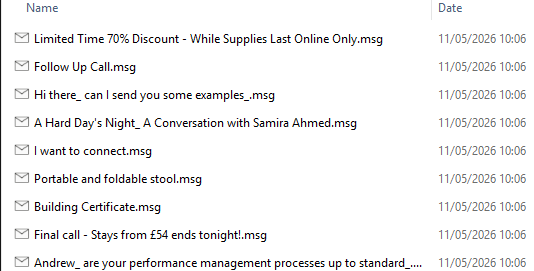
10 of the most egregious junk messages from my junk mail folder.
I'm going to ask the AI tools to compare them with this prompt:
I have attached 10 emails that I received recently in Outlook. The file extensions are .msg, but they can be read as text files. If you don't know the structure of an email stored in Outlook you should be able to infer this from the attached files.
Please can you summarise these emails, producing a table with the following headings:
- the name of the sender (not the email address)
- a summary in not more than 10 words of the email content
- a spam rating for the email (how likely in your opinion it is to be unsolicited and of no interest to me)
Please use the following spam ratings:
"Useful" (for an email which is likely to be of interest to me)
"Not sure" (where you can't be certain whether an email is junk or not)
"Disregard" (where you're fairly certain that an email is unsolicited or of no interest)
"Junk" (where the email is definitely one I should just ignore)
Please don't include any other text with your reply - just the table summarising the emails - but add a short sentence at the end explaining which one of the 10 emails it's most important that I should read (if any), and why. This sentence should be limited to no more than 30 words.
Test 2 - Creating images
When our children were younger I used to create travel bingo cards for them showing things that they should try to see on a long car journey. These were based on this game we used to play as children:
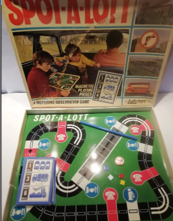
Spot-a-lott, which will bring back happy memories for ... almost no one.
To make things more interesting I used to add in one or two ridiculously easy things (to start them off) and one or two impossible ones (to make them laugh). I want my AI tools to recreate these cards, but better, using this prompt:
I want to create separate travel bingo cards for each of 2 children. Each card should consist of 12 pictures of things that the children have to see on a car journey in England (when they see something they can cross it off). The winner is the person who has crossed off most pictures by the end of the journey. About 80% of the journey will be by motorway; the rest by A roads.
The pictures should be portrait style, with 3 rows and 4 columns. The bingo cards should have the title "Wise Owl Travel Bingo". Your pictures should be designed for viewing by children, and each should have a legend beneath it explaining what the picture represents.
To get each child started, please include one or two pictures which should be very easy to see, and to make the children laugh please include one or two pictures which would be virtually or actually impossible to see. In producing the bingo cards you should assume that you are a primary school teacher or a parent with small children, so you know what would appeal to (say) an 8-year-old.
The pictures on the two bingo cards should be distinct (so no picture should appear on both cards), and should be roughly balanced - so it should be equally easy to see both sets of pictures.
Test 3 - Creativity
In many ways this is the hardest task for an AI tool, because I'm giving the least guidance. I'm going to ask my AI tools to create a funny short passage of text on a subject of my choice:
I want you to create a short story, article, anecdote or any other passage of text for me of not more than 250 words. The subject of the text should be someone using a self-service checkout till in a UK supermarket. Provided that your text is on this subject you can write whatever you like.
Please make the text that you write as funny as possible to appeal to someone with a fairly typical UK sense of humour.
Test 4 - Being an office assistant
We always struggle to explain our online training process to prospective clients - time to get some help in doing this! Here's the prompt I'm going to submit to the various AI tools, to get them to create a PowerPoint presentation we can show:
I want to explain our company's online training offering to prospective clients. The steps are as follows:
Someone books a place on one of our online courses
We contact them to arrange a time for a pre-course test.
During the pre-course test, which lasts no more than half an hour, we explain to the client how they can log onto our computers using the Windows Remote Desktop application for a course, so that we will be able to see their screen during training.
We also separately ask them whether they want a printed copy of the manual and exercises for the course sending out, and if they choose this option we post out a parcel containing the courseware manual and exercise booklet.
They attend the course itself!
I would like help with coming up with some interesting and entertaining ways to explain this process to prospective clients, bearing in mind that people have short attention spans. Please create a PowerPoint presentation containing 10 slides at the absolute most summarising the process so that we can play this to prospective clients.
Separately, I would also like you to create (if you are able to) a very short explainer video going through the above process. This should be amusing, entertaining, infromative - and short. If you can't do this, please say so.
You can find more information about our company at wiseowl.co.uk.
Test 5 - Coding support for casual programmers
If you're a full-time programmer you'll be aware of all of the dedicated coding environments and AI tools offered by the likes of Claude and ChatGPT. My interest is in getting our AI tools to write programs which will be usable by casual programmers, whose main aim is to solve ad hoc business problems. I'm going to ask my AI tools to write a fairly challenging program to find long word chains using simple, easily understandable code. I'll ask for versions in VBA and Python to make the output more accessible to a wider audience.
Here's my prompt:
I've attached a text file containing what you can assume to be all of the words in English. What I want to do is to find the longest possible word chain. The word chain should start with a two letter word, and add one letter for each new word. Each new word should be an exact anagram of the previous one, plus one additional letter. To give you an idea, here are some allowable word chains:
When you have found a long word chain, please check that the words that it uses are ones which the average educated English person is likely to know and understand.
Please write two versions of your code: one in Python and one in VBA within Excel. However, please also write code which is easy to understand for someone who dabbles in programming, rather than a full-time expert coder: so include comments and don't use difficult concepts like classes (in VBA) or list comprehensions (in Python). Where you have the choice between doing something on a single (complicated) line or breaking it into a few simpler lines, go for the latter option.
I have no idea which AI tool will come up on top. My two previous attempts to compare AI tools have both come up with the same conclusion: it doesn't really matter which tool you choose to use. Let's see if this is still the case!